On the App Store · iOS, iPadOS & macOS

A sunnier way to sit with your ukulele.

Learn songs. Catch melodies. Strum along to whatever you're humming. Ukulele Buddha is a practice companion that stays out of your way.

four strings. no rules. just the songs.

Free, forever. No account, ever.

11:48
Friday Evening
Hey,
Gabe.
G
what's it gonna be today?
Learn
Learn a song
Capture
Capture idea
Practice
Practice tools
Play
Just jam
Recent songs
Somewhere Over the Rainbow
Israel Kamakawiwoʻole
Riptide
Vance Joy
Can't Help Falling in Love
Elvis Presley
Home
Songs
Ideas
Tuner
Search
Manifesto

Learn a song. Hum an idea. Sit down and play.

just the songs and the time you spend with them.
What's inside

Built around how you actually play.

Nothing tracks you. Nothing nags you. Everything stays on your device.

Songs

Your library, on vinyl.

Pull songs from anywhere, or scan a chord sheet with your camera. Tell it the chords you know and it lists songs you can already play. Transpose any song and add a capo — chord shapes update instantly. Auto-scroll through tabs, loop a tricky passage at half speed without shifting the pitch, tap to simplify chords, line up setlists for jam night, or export the sheet as a PDF. A song's chord diagrams stay docked at the bottom while you scroll its page — tap one to blow it up, or tuck the bar away. Every song opens a one-tap search for a ukulele tutorial made for learners, alongside one for the original recording. The library remembers everything you've sat with — quietly, in order of how recently it mattered.

Ideas

Catch the melody before it floats off.

Hum it. Strum it. Write it down — Ukulele Buddha detects the chords automatically. Sketch tab ideas in the riff scratchpad. Tag it. Find it later.

Jam

A backing band, on tap.

Set a key. Pick a feel — island strum to blues shuffle. Drums, bass and keys lock in behind you. Loop it, change it, record yourself over the top.

Tuner

Sharp ear. Soft display.

GCEA standard, low-G, D tuning, baritone and custom.

Practice

Progressions, routines, drills.

Forty-one progressions sorted into nine packs — pop, rock, blues, folk, dreamy and more — with a full band behind them, most with a strum to match. Stack your own from the chords in your key, and pick the groove the band plays it in. Build a session too — string together a warm-up, a song, and a few drills, then run it with a calm timer. Finished sessions land in a simple log. No streaks, no pressure. Loop strumming patterns that count you in and speed up gently, learn fingerpicking rolls, find notes across the fretboard, drill chord changes against the clock, train your ear on progressions, and fall back on diagrams, scale boxes, and a metronome whenever you need a reference.

Hand-built, screen by screen

Made for the in-between moments.

The porch half-hour. The beach-bag ten minutes. The morning before anyone else is up.

10:08
Tab 2 · Library
Songs
Over the Rainbow
Israel K. · 1993
Riptide
Vance Joy · 2013
I'm Yours
Jason Mraz · 2008
Hey, Soul Sister
Train · 2009
Can't Help Falling in Love
Elvis Presley · 1961
Home
Songs
Ideas
Tuner
Search
8:14
Listening
GCEA · 4th string
G
In tune
G
C
E
A
nice and even
Home
Songs
Ideas
Tuner
Search
11:50
Jam
Rec
Island
Rock
Shuffle
Blues
Sequence
Edit
1234
84
BPM
TAP
Jam Key
Change
C
D
E
F
G
A
G Major Pentatonic
frets 2–5
maj
min
Beyond the phone

On your wrist, when your hands are full.

Metronome, tuner, and chord diagrams on Apple Watch — the tools you reach for most, one glance away.
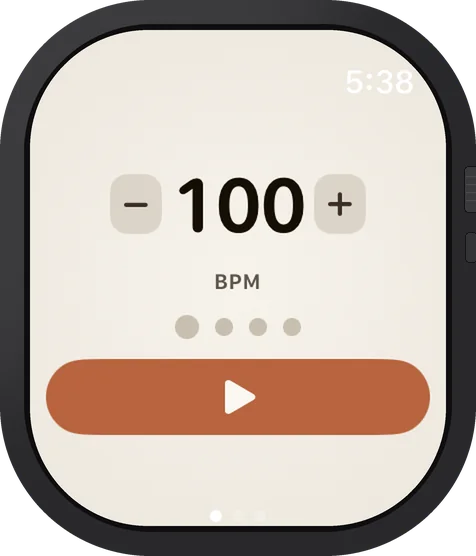
Apple Watch showing a metronome set to 100 BPM with a play button
Apple Watch

A metronome on your wrist.

Tap + or − to set the tempo. Feel every beat in haptics — no need to look down.
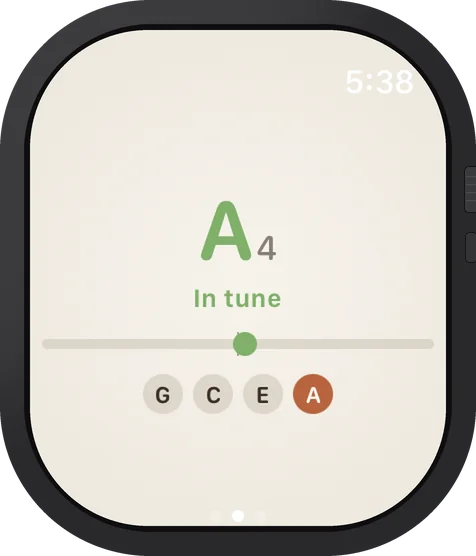
Apple Watch showing a tuner with the A string in tune
Apple Watch

Tune up without your phone.

An open-string tuner, right on your wrist. Check your tuning mid-song without reaching for anything.
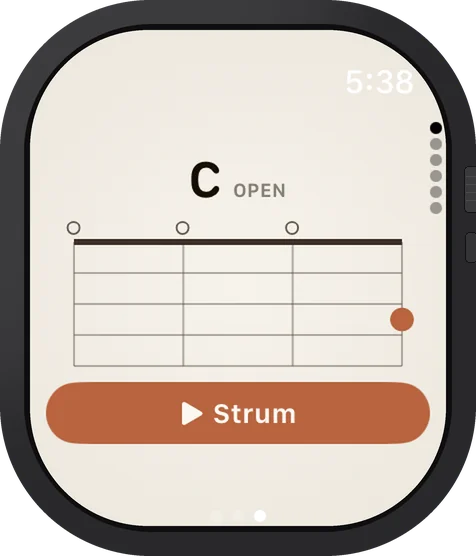
Apple Watch showing a C chord diagram with a Strum button
Apple Watch

Chord diagrams at a glance.

The shape you need, right there. Tap Strum to hear it — without touching your ukulele.

Home-screen widget

One tap to the tools you reach for.

Tuner, metronome, and jam — straight from your home screen, no digging through the app.

Local-first by design

Nothing leaves your phone.

No accounts. No syncing to "the cloud." No data sold or shared. Your songs, your ideas, your takes — all yours, on your device.

  • No accounts, ever. Open the app and you're already in.
  • No telemetry by default. We don't know how often you play, or what you play. Anonymous analytics run only if you opt in.
  • No internet required. Works on the porch, at the beach, off-grid.
  • One quiet check. The app asks the App Store whether a newer version is out — the app's ID and your store region, nothing else.
  • Your takes stay on your device. Export to share — never automatic.
Pricing

Free, with a tip jar.

Every feature, unlocked from day one. No subscription. No paywall. No ads tracking you between sessions.

$0Every feature · forever
if the app helps your practice, you can chip in — right in the app
$0.99
Thanks!
$4.99
Supporter
$9.99
Keep it strumming
no pressure. no paywall. just optional.
Four palettes

Pick the room you're playing in.

The app ships with four themes. Try them right here — your selection follows you down the page.

A note from the maker

I built Ukulele Buddha for the version of me who grabs the uke off the wall at 11pm, strums for forty minutes, and forgets what he was working on by Tuesday. It's a place to put the practice. Quietly. Without anyone counting.

— see you in there
Frequently asked

Questions, gently answered.

Is it out yet?+
Yes — it's out now on the App Store for iPhone and iPad, and on the Mac App Store. Android is on the way.
How much will it cost?+
Nothing — every feature is free, forever. See the Pricing section for details on the optional tip jar.
Which tunings does it support?+
Standard GCEA (high-G) out of the box, plus low-G, D tuning, baritone (DGBE) and fully custom — the tuner handles them all. Switch to baritone or D tuning and the chord library renames itself to match: the same familiar shapes, with the chord names and pitches your strings actually make.
What can I do with a song once I've added it?+
Transpose it and add a capo — chord shapes update instantly. Loop a tricky passage at half speed without losing pitch, auto-scroll through the tab, tap to simplify the chords, or export the sheet as a PDF. If the song has chords, its diagrams stay docked at the bottom while you scroll the song page — tap one to blow it up, or tuck the bar away with the chevron — and it suggests a strumming pattern you can loop slowly and speed up gradually. Every song opens a one-tap search for a ukulele tutorial aimed at learners, next to one for the original recording, and songs line up into setlists for jam night. You can also scan a printed chord sheet with your camera to add it straight to your library.
Can I build my own chord progressions?+
Yes. Practice has a Progressions tool with forty-one of them, sorted into nine packs — pop, rock, blues, folk, dreamy and more — most with a strum to match, and a full band behind them. If the one you want isn't there, build it: the palette leads with the chords in your key, plus borrowed chords and secondary dominants, each labeled as you go, and any chord can hang for a bar or four. Pick a groove and the whole band re-feels it — island, half-time, reggae. On the ones you build, your groove sticks.
Does it work without an internet connection?+
Yes — completely. Everything runs on-device — the song catalog, chords, scales and jam tracks are all bundled. No cloud, no streaming, no account. The only things that ever touch the network: leaving a tip, anonymous analytics if you've opted in, and a quick check with the App Store to see whether there's a newer version. Nothing you play or record goes anywhere.
Does it work on iPad?+
Yes — Ukulele Buddha is a universal app. It runs on iPhone, iPad, and Mac, with a layout that opens up on the bigger screens.
Why no streaks or goals?+
Because the moment practice becomes a game you can lose, you stop. Ukulele Buddha is built around showing up, not winning. The library remembers what you've sat with — that's all the tracking you need.
Is there an Apple Watch app or a widget?+
Both. A metronome, tuner, and chord diagrams live on Apple Watch. And a home-screen widget puts Tune, Metronome, and Jam one tap from your home screen. See the Beyond the phone section above.
Can I use it with other instruments?+
The tuner, jam tracks and metronome work with anything. The chord library and Practice drills are ukulele-first. If you play something else, meet the sister apps — Guitar Buddha, Bass Buddha, and Drum Buddha — the whole family lives at music-buddha.com.